Summary
Key points of this document
- The full migration involved broader changes than necessary.
- No SSH/FTP, no additional costs, no deletion of production-only data.
- Place the same dedicated plugin on both the sender and receiver sides.
Overview
Sometimes, you want to reflect only the necessary themes, posts, settings, and referenced media, while preserving production user and application information. Even in environments where SSH or FTP cannot be used, by pre-defining synchronization targets, collation rules, URL conversions, and recovery boundaries, it can be structured as a differential deployment initiated from the WordPress admin screen.
The full migration involved broader changes than necessary.
As a method for reflecting a development WordPress environment to production, plugins that migrate the entire site at once are a straightforward choice. However, a method that replaces files, databases, plugin states, and users all at once expands the scope of impact, especially when the desired migration scope is limited. From an experience where a full migration became unstable midway, requiring all plugins to be disabled for recovery, and even media references were broken, I re-evaluated the migration unit itself.
Another problem is the difference in upload destinations. Even if the development environment uses the standard/wp-content/uploads, the production environment may have its own unique upload path for operational reasons. Simply transferring URLs and file paths in the database as they are will result in images and videos not being displayed, even if the files exist.
What was needed was not a mechanism to duplicate the site. It was a mechanism to safely and repeatedly reflect only the limited data managed on the development side, while preserving user and application information that exists only in production.
- Failures in full migrations tend to expand the scope of recovery to the entire site.
- Differences in upload paths and URLs cannot be resolved by file transfer alone.
- Instead of making production a replica of the development environment, synchronize only the managed items.
No SSH/FTP, no additional costs, no deletion of production-only data.
The premise is to complete operations from the WordPress admin screen, without using SSH or FTP, and without relying on external services that incur additional costs. We configured it so that an administrator can install a dedicated plugin and perform connection checks, differential checks, reflection, result checks, and rollbacks when necessary, all from the admin screen.
Synchronization targets include custom themes, explicitly allowed options, custom posts equivalent to events, custom posts equivalent to technical/utilization columns, dedicated meta, taxonomies, featured images, and images, videos, and PDFs actually referenced from the body and meta. The WordPress core, users, application information, settings and active states of other plugins, and unrelated media are excluded.
Deletions are also not automatically propagated. The policy is not to delete posts or files in production just because they don't exist on the development side. Defining synchronization as 'updating managed items' rather than 'making identical' clarifies the boundary for protecting production-only data.
- Synchronization targets are defined by a whitelist, not only by type, but also by option name, post type, meta key, taxonomy, and referenced media.
- Do not update users, application information, other plugins, or the WordPress core.
- To preserve production-only data, do not delete based solely on existence differences.
Place the same dedicated plugin on both the sender and receiver sides.
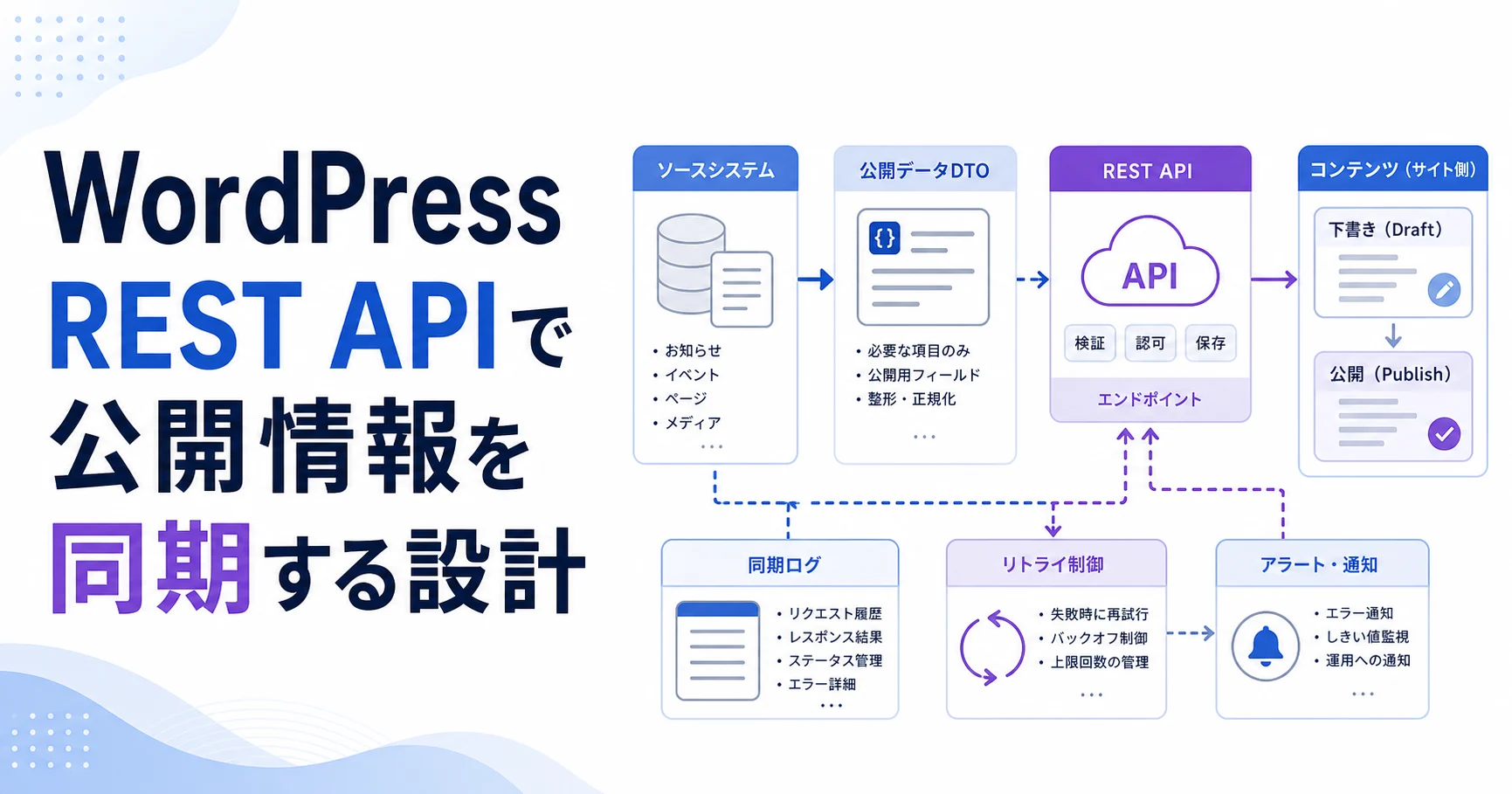
The same dedicated WordPress plugin is installed on both the sender and receiver sides. The sender scans the synchronization targets to create a manifest and expected values, displaying the differences in the admin screen. The receiver handles status checks, preparation for application, file reception, application, and rollback via an authenticated REST API.
The REST API responsibilities are divided into status checks, preparation, resumable file transfers in 4MiB units, application, and rollback. By not processing everything in one long request and separating transfer from application, it's easier to resume from shared server execution time limits or temporary communication failures.
The sender never directly connects to the production database. By having the receiver itself execute WordPress permission checks, destination resolution, and post APIs, environment-specific settings are confined to the receiver's WordPress.
- Sender: Target extraction, expected value generation, difference display, process progress management.
- Receiver: Permission verification, destination resolution, backup, reception, application, recovery.
- Separate transfer and application; do not resend from the beginning upon failure.
Protect with HTTPS, Application Password, and manage_options in layers.
HTTPS and WordPress Application Passwords are used for connections. Even if authentication with an Application Password succeeds, application is not permitted; each REST API permission checkmanage_optionsrequires manage_options. If the dedicated account lacks sufficient permissions or the authentication information is invalid, the process is rejected before preparation or transfer.
Application Passwords can be issued separately from regular login passwords and revoked for each purpose. The value held by the sender is encrypted with a key derived from WordPress authentication keys and stored in dedicated settings within the sender's database. Regular passwords or plaintext credentials are not left in logs, Git, or distribution files.
The design ensures that changing the authentication key makes existing ciphertexts undecryptable. In such cases, connection information must be re-registered. As secret information is held in a recoverable state for extended periods, the Application Password's purpose name, issuer, and revocation procedures are included in operational procedures.
- Communication channels are limited to HTTPS.
- Separate authentication and authorization, checking manage_options in addition to the Application Password.
- Do not use regular passwords, and do not leave plaintext in stored values, logs, or Git.
Execute from pre-check to completion in the same order.
The operational procedure has been fixed to 'Pre-check → Diff display → Production deployment → Smoke test → Completion'. During the pre-check, we verify the receiver's version, permissions, writeability, PHP requirements, upload destination, and the status of the double-execution lock. In the diff display, administrators confirm the number of additions, updates, transfers, and reuses before deployment.
When deployment begins, the receiver backs up the scope to be overwritten, and creates a deployment unit identifier and lock. Only missing files are transferred, and after all checksums match, media, taxonomies, posts, options, and themes permitted by the manifest are applied.
After application, representative URLs such as public pages, target posts, images, and videos are smoke-tested. If any intermediate validation or post-application check fails, an automatic rollback from the current backup is performed, and it is not considered a success.
- Make it a public condition that administrators can read the differences before application.
- Make the completion of missing file transfers and checksum matching a condition for starting the application.
- Separate deployment success from smoke test success, and consider it complete only after the latter passes.
Files are sent in 4MiB chunks and verified by relative path and SHA-256.
Files for themes and referenced media record their relative path, size, and SHA-256 in the manifest. If the receiver has a file with the same relative path and SHA-256, it will not be transferred. Only files with different content are sent in 4MiB units, allowing resumption from the last received position.
Each chunk validates the deployment unit, target file, and offset, then appends to a temporary area. After receiving the final chunk, the SHA-256 of the entire file is recalculated, and it is not moved to the application candidate unless it matches the manifest. This is to separately confirm communication success and content consistency.
The relative paths handled by the receiver are normalized,.. and absolute paths and unexpected roots are rejected. Even for APIs with administrator privileges, boundaries are established beforehand to prevent writing outside of theme or upload areas.
- Existing files with matching relative paths and SHA-256 are not re-transferred.
- Chunk transfers resume by matching deployment, file, and offset.
- Path traversal and checksum mismatches are rejected before application.
Posts are mapped using a dedicated source synchronization ID, preserving production-only posts.
Post mapping uses dedicated metadata to identify posts from the synchronization source. If a post with the same source synchronization ID is found on the receiver side, that post is updated. If not found, a new one is created, and a mapping relationship independent of the receiver's auto-assigned ID is saved.
What is synchronized are allowed post types, post bodies, dedicated meta, taxonomies, and featured images. Posts that only exist on the receiving side and do not have a source ID are retained. This rule allows for iterative updates only to posts managed on the development side, without deleting posts added on the production side.
Corresponding meta must be unique. When applying this to other projects, it is safer to design it so that it does not automatically repair ambiguous states. In the preparation phase, check not only for duplicates within the manifest but also whether the same synchronization source ID is already attached to multiple posts on the receiving side.
- The correct key is not the post ID on the receiving side, but the synchronization source ID stored in the dedicated meta.
- Retain production-only posts that do not have a synchronization source ID.
- If there are duplicate or conflicting correspondences, stop and confirm before applying.
Media storage location is resolved only from wpuploaddir()
Media does not bring absolute paths or URLs from the development environment to the receiving side. On the sending side, relative paths from the upload base are recorded in the manifest, and on the receiving side, the actual files and public URLs are assembled using the storage location and URL returned bywp_upload_dir() as the sole source of information. This absorbs the difference between standard paths and unique upload paths.
Images include not only the featured image of the attachment but also the derived sizes and original of responsive images generated by WordPress in the manifest. For videos and PDFs, only those actually referenced from the target post or meta are collected. Since the entire upload area of the site is not duplicated, unrelated files are not included.
If a file with the same relative path and SHA-256 already exists, it is reused. If only the file exists and there is no WordPress attachment registration, the existing file is used to register attachment information and necessary metadata without re-transferring. It is important not to treat the existence of a file and the existence of an attachment post as the same thing.
- Carry relative paths from the upload base, not absolute paths or development URLs.
- Handle derived sizes, originals, and referenced images/videos/PDFs in a single manifest.
- Reuse existing files and recover states where only attachment registration is missing.
As a result of using the same numeric ID as the initial migration candidate, 26 items were missing.
During the initial migration, there was no mapping using dedicated meta. Therefore, a fallback was implemented to consider posts with the same numeric receiving-side post ID as the synchronization source ID to be the same post. This was a compatibility measure to take over existing sites, but it conflicted with the receiving side's auto-assigned IDs.
A newly created post may later be assigned the same numeric ID as another synchronization source post that is processed afterward. If subsequent processing reuses that ID as an initial migration candidate, it will overwrite the previously created post with different content. Even if it appears that 100 posts were synchronized in terms of processing count, ultimately 26 posts were missing.
This failure also indicates that completeness cannot be confirmed solely by the number of successful API calls or loop iterations. Without cross-referencing the set of source IDs, the set of corresponding metadata stored on the receiving side, and the number of target posts, deletions due to overwrites cannot be detected.
- Auto-incrementing IDs change with each environment and cannot serve as synchronization keys.
- The number of successful responses and the number of unique posts existing after reflection are different metrics.
- Verify not only the count but also the consistency of the set of source IDs.
Never reuse mapped candidates for a different synchronization source.
After correction, the highest priority is given to correct mapping using dedicated metadata. Using numerical IDs or slugs as fallbacks is only for the initial migration when candidate posts do not yet have a source ID. If a candidate is already mapped to a different source ID, it will not be reused even if the numerical ID or slug matches.
The judgment is not merely "was a candidate found?" but "is it acceptable to assign that candidate to the current synchronization source?" Posts newly created during manifest processing are also immediately treated as mapped, preventing subsequent posts from being taken by initial fallback.
The same applies to slugs. It's possible for a post created manually on the production side to coincidentally have the same slug. It is safer to only consider unmapped posts for migration, and for irresolvable conflicts, instead of automatically overwriting, present them as conflicts on a diff screen.
- The priority is: correct source ID mapping → unmapped identical ID → unmapped identical slug → new creation.
- Do not reuse candidates with a different source ID, even if the ID or slug matches.
- Conflicts that cannot be resolved automatically should be subject to pre-reflection confirmation rather than overwriting.
Convert upload URLs first, then exclude loopback URLs later.
Another failure was that old development URLs remained in the body of CTAs and other content. Even if only the current development site URL is replaced with the production URL, the separate port localhostpreviously used will not match.127.0.0.1 URLs using IPv6 loopback also have the same problem.
The conversion was done in two stages. First, the sender's upload base URL is replaced with the base URL obtained from the receiver's wp_upload_dir(). Then, localhost, 127.0.0.1, and any HTTP or HTTPS URL with an IPv6 loopback port are replaced with the receiver's home URL.
The order is important. If loopback URLs are changed to home URLs first, the relative part of upload files may not be preserved correctly. Processing the clearly defined upload base URLs first, and then removing remaining development hosts with general rules, makes the conversion scope easier to explain.
- Inspect not only the current development URL but also any loopback URLs used in the past.
- Perform upload base URL conversion before general host conversion.
- Include arbitrary ports and IPv4/IPv6 loopbacks in validation cases.
Determine differences based on the expected value after conversion and the actual data, not the previous hash.
Initially, we thought we could determine if changes occurred by comparing the hash saved during the previous deployment with the current submitted value. However, if the value before submission remains the same even after improving the URL conversion rules, it won't register as a difference. Values manually edited on the production side would also be overlooked if we only looked at the previous hash.
The difference determination method has been changed to directly compare the expected value, after applying the current conversion rules, with the actual data currently stored on the receiving side. The post body, target metadata, allowed options, etc., will be normalized to the format stored on the receiving side before comparison.
With this method, improvements to conversion rules will appear as changes in expected values, and manual edits on production will appear as differences from actual data. The previous state can be used for auditing and explanation, but the key is not to consider it the definitive source for determining whether a current deployment is necessary.
- The expected value is created in the storage format after applying the current conversion rules.
- The comparison target is the actual data currently existing in production, not the previous record.
- Enable displaying reasons for differences, categorized as changes in submitted values, changes in conversion rules, or changes on the production side.
Retain 3 generations of limited backups immediately before deployment.
Before application, we back up custom themes, target options, target posts, and media to be overwritten this time to a protected area. Instead of duplicating the entire site each time, we save the scope that this deployment might change in a recoverable form, retaining the most recent three instances.
Rollbacks are not performed individually for just themes or just posts, but rather by reverting to a snapshot saved as a single deployment unit. This is because if only a part is rolled back while partially applied, the expected relationship between posts and media, or options and themes, would be broken.
The 3-generation limited backup is a mechanism for automatic recovery in a short time. It is not intended to revert server failures, entire database corruption, or erroneous operations on data outside the synchronization target. Its role is distinct from hosting-side backups or regular backups to separate media.
- The backup scope should match the current write target.
- Align application and recovery units to prevent data inconsistency from partial rollbacks.
- Do not use limited backups as a substitute for site-wide disaster recovery.
Themes are swapped from a verified temporary area.
Themes do not sequentially overwrite files in the public directory upon receipt. First, PHP syntax, essential files, SHA-256 of the manifest, required PHP version, and write permissions for the target are checked in a temporary area. Only artifacts that pass all checks are designated for replacement.
For fatal errors immediately after replacement, we use MU plugin guards, which load earlier than regular plugins. If a fatal error is detected in the request immediately after an update, it automatically reverts to the previously backed-up theme. This prevents situations where the admin screen itself becomes inaccessible and cannot be resolved by manual operations from the admin screen.
Syntax checking alone does not guarantee operation. Template execution, required functions, plugin integration, and HTTP responses of public pages are separately confirmed with a smoke test after replacement.
- Do not write chunks directly to the active theme.
- Verify PHP syntax, essential files, SHA-256, PHP requirements, and write permissions before replacement.
- Separate automatic recovery from fatal errors and smoke tests for public pages.
Verify rejections and resumptions, not just normal operations.
Safety verification confirms not only successful synchronization but also the ability to reject and recover from dangerous inputs or partial failures. Specifications that escape relative paths, checksum mismatches, insufficient permissions, and authentication failures are stopped before modifying target files or production data.
If two deployments run simultaneously to the same receiver, backup and application order will be mixed. Therefore, the receiver acquires a deployment-unit lock and rejects dual execution. The lock must have an expiration date and status check, and a recovery path is also needed to prevent permanent inoperability due to communication disconnection.
In resumed transfers, the already received position and chunk content are verified to safely handle retransmission of the same chunk. This simultaneously verifies the ability to retry and prevent duplicate application.
- Rejection cases: path traversal, checksum mismatch, authentication failure, insufficient permissions.
- Concurrency cases: dual execution lock, recovery from expired lock.
- Retry system: transfer resumption from interruption point, retransmission of the same chunk, and one-time application.
Validated under conditions including a unique upload path and production-only posts.
For validation, we prepared a WordPress environment with a unique upload path equivalent to production. We confirmed the initial reflection and re-execution with a scale of 100 custom posts equivalent to technical/utilization columns, 13 posts equivalent to events, and 622 referenced media files.
Existing files were reused with relative paths and SHA-256, resulting in 0 retransfers. After correcting ID matching, we confirmed that posts, taxonomies, and featured images were reflected without duplication, no data was lost due to overwriting, and production-only posts were retained.
We confirmed not only the initial reflection but also that the difference becomes 0 upon re-execution of the same deployment, rollback, re-reflection, and that representative URLs for images and videos return HTTP 200. We set separate passing conditions for 'succeeded once,' 'can be rolled back,' 'can repeat the same input,' and 'can be retrieved from the reference destination.'
- Scale: 100 target custom posts, 13 event-equivalent posts, 622 referenced media files.
- Differences: 0 retransfers of existing files, 0 differences on re-execution of the same deployment.
- Integrity: Unique correspondence of posts, taxonomies, featured images, and retention of production-only posts.
- Recoverability: Rollback, re-reflection, HTTP 200 for image/video URLs.
Differentiating between full migration, SSH deployment, and admin screen differential synchronization.
If you are creating a new production environment as a complete replica of the development environment and production data such as users and orders does not yet exist, a full migration is simpler. Conversely, if you continuously manage only themes and limited content while retaining data that grows in production, a whitelist-based differential synchronization is more suitable.
When SSH or a deployment platform can be used, switching signed and verified artifacts on the server side can sometimes make file operations and monitoring easier to set up. The admin screen-only method is not a superset of the SSH method; it is a choice to make WordPress itself the execution boundary in environments with limited connection options.
The deciding factor, even before connection methods, is what is considered correct and how much to synchronize. Determine whether you need the entire site, only code, or differences including limited data, and then align the meaning of deletion, conflict, and rollback to that unit.
- Full migration: For initial builds where production can be completely replaced and environmental differences are small.
- Artifact deployment via SSH, etc.: For environments focused on code, where server-side switching and monitoring can be designed.
- Admin screen differential synchronization: For environments that retain production-only data and continuously reflect permitted WordPress data.
First, define the scope that this method does not cover.
This mechanism is not a general-purpose database migration. It does not cover the WordPress core, general plugins, plugin-specific tables, users, or transactional data such as applications and orders. Projects that modify these will require individual migration design, downtime, and consistency checks.
Even with 4MiB resumable transfers, shared server capacity, execution time, HTTP limits, WAF, and PHP memory limits still apply. For large files or numerous changes, we verify the limits for preparation, transfer, and application, the number of retries, and temporary space recovery for each environment.
The double-execution lock prevents conflicts between deployments but does not stop simultaneous updates by editors. If there is an operation where target posts are directly edited in production, decide on the reflection time, conflict display, and which version is considered correct. Also, in designs that do not propagate deletions, organizing unnecessary posts and files requires a separate, approved operation.
- Prepare a separate migration method for plugin-specific tables and transaction data.
- Measure HTTP transfer limits and temporary space under actual hosting conditions.
- Manual edits and deletions in production have conflict and approval rules separate from synchronization.
Safety is determined by the synchronization boundaries and expected state, rather than the transfer method.
The inability to use SSH or FTP does not mean that only a full migration can be chosen. By using WordPress's REST API, permissions, and destination resolution, and by limiting synchronization targets with an allowlist, you can design a differential deployment that uses the admin screen as an entry point.
However, merely being able to transfer is not enough. It is important not to link posts by environment-specific numeric IDs, to resolve upload destinations fromwp_upload_dir() , to compare the expected values after URL conversion with actual production data, and to design reflection and recovery in the same units.
When applying this to other projects, first list out 'data to be retained in production,' 'data where the development side is considered correct,' and 'conditions for not automatically updating on conflict.' Once these three are decided, you can concretize the boundaries for APIs, manifests, backups, and verification.